
Best AI Writing Tools 2026: The Complete Guide for Creators
Most lists of best AI writing tools 2026 hand you 20 options and leave you paralysed. This guide does the opposite: it shows you which tools actually matter, what each one does best, and how to stack them into a lean system that produces more content in less time.
Best AI Writing Tools 2026: What Actually Works
You don’t need 20 AI tools. You need three.
That’s the conclusion I landed on after testing every major writing tool on the market: ChatGPT, Claude, Jasper, Rytr, Copy.ai, Perplexity, Writesonic, Grammarly, and more. Most of them overlap. Most of them can be replaced by something free or cheaper. And most people buy them without a workflow to plug them into.
Here’s the framework I use: one tool for research, one for drafting, one for editing and polish. That’s the entire stack. Everything else is noise.
The tools that earned their place in 2026:
- Perplexity → research and source-backed ideation
- Claude → long-form drafting, brand voice, structured content
- Grammarly → final edit, readability, tone check
If you’re writing blog posts, newsletters, or social content as a solo creator, this three-tool stack covers 95% of your needs for under $40/month combined.
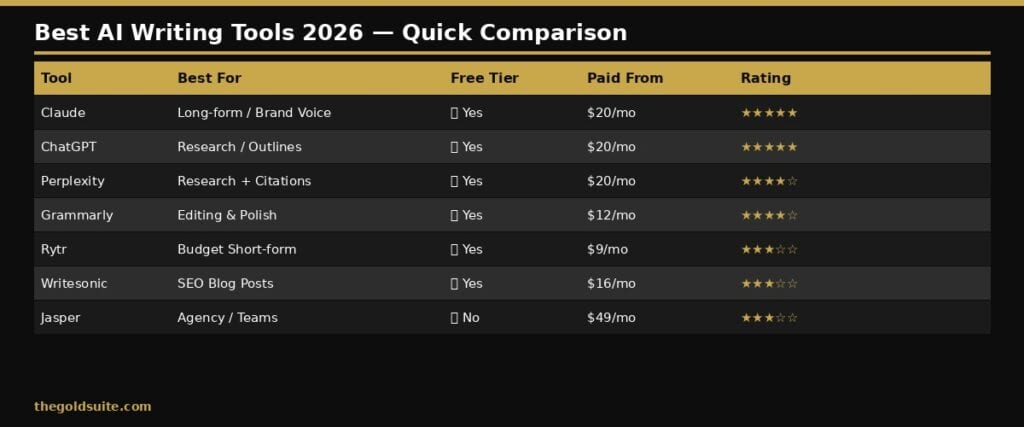
The 7 Best AI Writing Tools Compared
Not every creator needs the same stack. Here’s an honest breakdown of the top options in 2026, who they’re actually for, and what they cost.
1. Claude (Anthropic)
Best for: Long-form blog posts, brand voice consistency, structured essays
Claude is the tool I reach for when quality matters most. It produces the most natural-sounding output of any AI I’ve tested: no robotic phrasing, no keyword stuffing, no generic transitions. When I was building my newsletter to 18,000 subscribers, Claude was the drafting engine behind most of the content that drove growth.
The free tier gives you solid access. Claude Pro ($20/month) unlocks longer context windows and priority access. For creators writing 4–8 pieces per month, Pro pays for itself in hours saved.
- ✅ Best output quality for long-form content
- ✅ Handles nuanced brand voice instructions well
- ❌ No built-in SEO scoring
- ❌ Requires a good prompt to get great output
2. ChatGPT (OpenAI)
Best for: Research, brainstorming, outlines, short-form copy
ChatGPT is the Swiss Army knife of AI writing. It’s fast, flexible, and the free tier is genuinely useful. GPT-4o handles text, research, image analysis, and web browsing, which makes it a strong research partner before you move to a dedicated drafting tool.
Where ChatGPT underperforms is on long-form voice consistency. Extended articles tend to drift toward a generic AI tone. Use it for ideation and structure, not for final copy.
- ✅ Fast and flexible for ideation
- ✅ Free tier covers most casual use cases
- ❌ Long-form output drifts toward generic tone
- ❌ Less reliable for brand voice adherence
3. Perplexity AI
Best for: Research, fact-checking, real-time source citations
Perplexity is the research tool that other AI tools wish they were. Every answer comes with cited sources, so you’re not just getting AI output. You’re getting AI-curated research with links you can verify. For SEO content that needs to cite statistics, studies, or current data, Perplexity cuts research time in half.
I use it at the start of every article. Search your topic, pull the key stats and angles, then move to Claude for the actual writing.
Perplexity AI (free tier available; Pro at $20/month)
- ✅ Real-time web search with citations
- ✅ Excellent for research-heavy content
- ❌ Not a drafting tool — use it upstream in your workflow
4. Jasper AI
Best for: Marketing teams, high-volume branded content, agencies
Jasper is built for teams producing large content volumes consistently: landing pages, ad copy, email sequences, and social posts within a defined brand voice. Jasper IQ learns your brand’s tone, products, and style, which makes it powerful for organisations with multiple writers.
For solo creators, Jasper is overkill. Pricing starts at $49/month and climbs fast. You’re paying for team features you won’t use. Unless you’re running a content agency or managing multiple brands, Claude and ChatGPT cover what Jasper does at half the price.
- ✅ Strong brand voice enforcement at scale
- ✅ Built for marketing copy workflows
- ❌ Expensive for solo creators ($49+/month)
- ❌ Overkill for individuals
5. Rytr
Best for: Budget creators, short-form copy, beginners
Rytr is the most accessible AI writing tool on this list. The free tier gives you 10,000 characters per month, enough to draft 3–4 social posts or a short blog intro. The paid plan starts at $9/month, making it the cheapest option that still produces usable output.
Quality is a step below Claude or ChatGPT, but for creators on a tight budget who need short-form copy quickly, Rytr gets the job done.
Rytr — free tier available
- ✅ Cheapest paid option on the market
- ✅ Good for short-form: emails, captions, outlines
- ❌ Quality drops on long-form content
- ❌ No research capabilities
6. Grammarly
Best for: Final editing, clarity, tone, grammar polish
Grammarly is not a writing tool. It’s an editing tool. You use Grammarly after you’ve drafted with Claude or ChatGPT, not before. It catches grammar errors, improves sentence clarity, flags passive voice, and provides a tone check that tells you whether your content reads as confident, formal, or friendly.
The free tier handles grammar and spelling. Grammarly Pro ($12/month) adds style suggestions, tone detection, and plagiarism checking. Worth every dollar if you’re publishing consistently.
- ✅ Best-in-class editing and polish layer
- ✅ Works across all browsers and apps
- ❌ Not a drafting tool — use it last in the workflow
7. Writesonic
Best for: SEO-focused blog posts, marketers wanting AI and SEO in one tool
Writesonic combines AI writing with SEO features: keyword integration, content scoring, and a built-in article generator that produces full blog posts from a keyword prompt. It competes directly with Jasper but at a lower price point.
Long-form output quality is decent but inconsistent. For creators who want writing and SEO scoring in one tool without adding Surfer SEO separately, Writesonic is worth testing.
- ✅ Built-in SEO scoring and keyword integration
- ✅ More affordable than Jasper
- ❌ Output quality inconsistent on longer content
- ❌ Less control over brand voice than Claude
Building a content system that actually scales takes more than picking the right tools. It takes the right architecture — a lean stack that compounds over time without burning you out. My free playbook breaks down the exact system I use to create, distribute, and monetise content consistently.
The Lean AI-Powered Business Playbook for Creators — includes the full creator workflow, AI tool stack, and the $88/month setup that replaced a $340/month tool graveyard.
How to Build an AI Writing Workflow That Actually Sticks
Most creators buy AI tools and then wonder why they’re still stuck. The tools aren’t the problem. The workflow is.
Here’s the three-phase system I use for every piece of content:
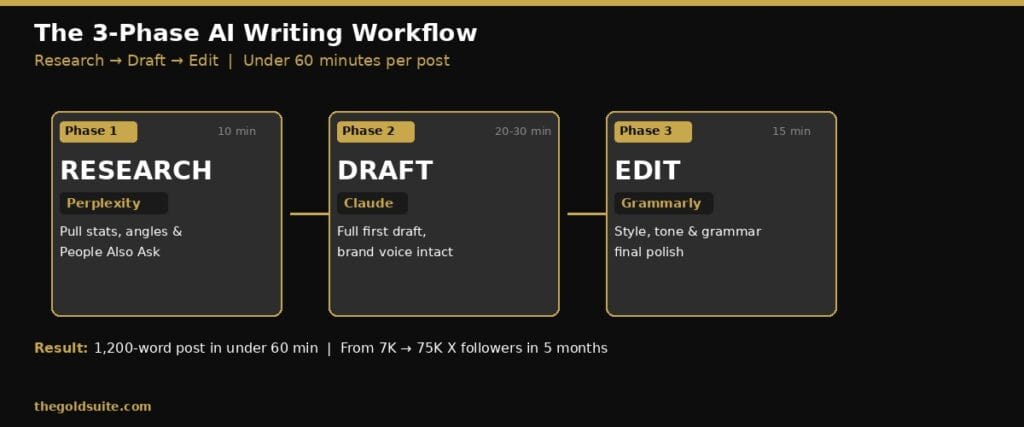
Phase 1: Research (10 minutes)
Open Perplexity. Search your topic. Pull 3–5 key stats, competing angles, and “People Also Ask” questions. Save them or paste them directly into your Claude prompt.
Phase 2: Draft (20–30 minutes)
Take your research into Claude. Give it your outline, brand voice notes, target keyword, and word count. Let it produce a full first draft without interruption.
Phase 3: Edit and Polish (15 minutes)
Paste the Claude output into Grammarly. Run the style and tone check. Fix what flags. Then do one final human pass: tighten the intro, sharpen the conclusion, remove anything that doesn’t sound like you.
Total time: under 60 minutes for a 1,200-word blog post. That’s the system that let me grow from 7,000 to 75,000 organic followers on X in 5 months — content volume without content burnout.
What to Look for When Choosing an AI Writing Tool
If you’re evaluating tools beyond this list, here’s what actually matters:
Output quality on long-form content. Test any tool with a 1,000-word request. Mediocre tools produce generic structure and drift in tone by paragraph five.
Brand voice retention. Paste in three examples of your writing and ask the tool to match it. Good tools adapt. Average tools default to corporate filler.
Pricing vs. your actual use case. A $49/month tool is only worth it if it saves you $49 of time or generates $49 in revenue. Run that calculation honestly before you buy.
Integration with your existing workflow. An AI tool you don’t use consistently is worse than no tool at all. Pick tools that fit naturally into how you already work.
What This Means for You
The best AI writing tool in 2026 is the one you’ll actually use in a repeatable system. For most solo creators, that’s Claude for drafting, Perplexity for research, and Grammarly for editing. Everything else is optional.
Start with the free tiers. Build the workflow first. Then upgrade when the friction of the free tier costs you more time than the paid plan would save.
The goal isn’t the best tool. It’s consistent output without burning out.
Best AI Writing Tools 2026 FAQs
What is the best AI writing tool for beginners in 2026?
Claude and ChatGPT are both strong starting points for beginners. Both have generous free tiers and produce readable output without requiring advanced prompting skills. Start with ChatGPT for brainstorming and outlines, then move to Claude when you’re ready for longer, more polished drafts.
Is Claude better than ChatGPT for blog posts?
For long-form blog content, Claude generally produces more natural-sounding output with better voice consistency. ChatGPT is faster for research and ideation. Most experienced creators use both: ChatGPT for structure and ideas, Claude for the actual writing.
Which AI writing tool is best for SEO content?
For SEO-focused blog posts, pair Claude or ChatGPT for drafting with a dedicated SEO tool like Surfer SEO for keyword optimisation. Writesonic bundles both functions in one tool if you want a simpler setup.
Can AI writing tools replace human writers?
No. Not for content that requires authentic experience, original research, or genuine brand voice. AI tools work best as co-pilots: they handle speed and structure, you handle creativity and authenticity. The creators winning with AI in 2026 aren’t replacing their voice. They’re amplifying it.
How much do AI writing tools cost in 2026?
Costs range from free (ChatGPT, Claude, Rytr free tiers) to $9/month (Rytr), $12/month (Grammarly Pro), $20/month (Claude Pro, Perplexity Pro), and $49+/month (Jasper). A lean three-tool stack of Claude Pro, Perplexity Pro, and Grammarly Pro runs around $52/month and covers everything most solo creators need.