
The best free AI writing tools for freelancers aren’t the ones with the longest feature lists. They’re the ones that save you real hours on real client work, without a monthly bill eating your margins.
Best Free AI Writing Tools: What Actually Matters for Freelancers
Most roundups will dump 20 tools on you and call it a day.
That’s not useful. You’re a freelancer. You bill by output, not by the number of browser tabs you have open. What you actually need is a short stack of free tools that each do one job exceptionally well.
Here’s the honest picture: the free tiers on most AI writing tools are intentionally limited. Rytr caps you at 10,000 characters per month. Writesonic now gives you one full article and five chats before asking for a credit card. Copy.ai’s free tier is generous on short-form but falls short for long articles.
The tools worth your attention are the ones where the free tier is genuinely usable for professional work. Not a 3-day trial disguised as “free forever.”
I tested every tool on this list with real client briefs: blog posts, email sequences, LinkedIn content, and product descriptions. Here’s what stood up.

1. ChatGPT Free: The Versatile First Draft Machine
ChatGPT’s free tier (GPT-4o) is the most useful all-around writing assistant available without paying a cent.
What it’s actually good at:
- Generating structured first drafts from a bullet-point brief
- Brainstorming angles and headlines fast
- Rewriting sections in a different tone
- Researching topics with cited web results (free tier now includes Browse)
The real limitation: ChatGPT Free uses a rolling window of roughly 10 to 15 high-intelligence responses before switching you to the lighter GPT-4o Mini model mid-session. If you’re deep in a 2,000-word article and hit the cap, the quality drop is noticeable.
For short-form client work like social captions, email subject lines, and ad copy, the free tier holds up across a full workday. For long articles back-to-back, you’ll feel the ceiling.
✅ Best for: Versatile drafting, ideation, research summaries
❌ Not ideal for: Long article sessions without hitting usage limits
2. Claude Free: The Best AI for Natural, Polished Writing
If ChatGPT is your workhorse, Claude is your editor.
Claude’s free tier (Sonnet model) produces writing that sounds significantly less robotic than most AI tools. That matters when you’re writing for clients who will immediately notice if a piece reads like it was assembled by a machine.
Where Claude consistently wins:
- Long-form content that needs to sound human
- Summarising research documents and long PDFs
- Tone matching: feed it a sample of your client’s existing content and it mirrors it accurately
- Nuanced rewrites where you want to preserve the original meaning
The real limitation: Claude’s free tier has message limits. You’ll hit a soft cap after sustained use and get asked to wait or upgrade.
The workaround most freelancers use: Claude for drafting, ChatGPT for research. Together, the two free tiers cover most of a full workday.
“In 2026, many professional editors prefer Claude’s free tier because its output sounds significantly less robotic.” — AIWisePicks
✅ Best for: Long-form drafts, tone matching, editing passes
❌ Not ideal for: High-volume short bursts across an entire day
If you want to go beyond free tools and build a proper AI content system for your freelance business, the approach that changed how I work is in my free playbook.
The Lean AI-Powered Business Playbook for Creators — the exact AI stack and workflow system I use to produce more, work less, and stop starting from scratch on every client brief.
3. Rytr Free: Best Free AI Writing Tool for Short-Form Copy
Rytr is purpose-built for the formats freelancers write most: emails, ad copy, product descriptions, social posts, and blog intros.
The free tier gives you 10,000 characters per month — roughly 1,500 to 2,000 words. That sounds tight, but Rytr is built for short, structured outputs. You’re not writing a 3,000-word article here. You’re generating five email subject line variations in 30 seconds and picking the best one.
What makes Rytr worth including alongside ChatGPT and Claude:
- Use cases are built in. Select “Email” or “Product Description” and it knows the structure to follow. No prompting from scratch every time.
- Tone controls. Convincing, casual, professional, humorous — Rytr adjusts with a dropdown.
- Built-in plagiarism checker. Rare on a free plan, and useful when handing content to clients.
The 10,000-character cap resets monthly. Use it strategically: batch your short-form client work in one sitting and let Rytr handle the heavy lifting.
✅ Best for: Email copy, ad copy, product descriptions, social captions
❌ Not ideal for: Long-form articles or daily unlimited use
4. Perplexity AI Free: The Research Tool That Replaces 30-Tab Google Sessions
This one isn’t a writing tool in the traditional sense. It’s a research tool. And for freelancers, it’s one of the most underused free options available.
Perplexity answers your research questions with synthesised, cited responses. Instead of opening 8 browser tabs and cross-referencing sources manually, you ask Perplexity and get a clean answer with numbered references you can verify.
For freelancers this means:
- Background research on an unfamiliar client niche done in 10 minutes
- Finding recent statistics and data points with actual citations
- Fact-checking AI-generated claims before including them in client work
The honest caveat: Perplexity can still be wrong. Always verify data points before including them in published work. Especially anything numerical.
According to Email Vendor Selection’s 2026 AI writing tools review, Perplexity consistently ranks as one of the most valuable free research tools for content professionals.
✅ Best for: Niche research, finding statistics, fact-checking AI output
❌ Not ideal for: Generating polished draft copy
5. Grammarly Free: The Non-Negotiable Final Pass
Every piece of client work should go through Grammarly before it leaves your drafts folder.
The free tier covers the essentials: grammar, spelling, punctuation, and basic clarity suggestions. It’s not glamorous. It won’t generate a word of content. But it catches the errors that AI writing tools regularly produce: repeated words, missing commas, subject-verb disagreements. And it does it in seconds.
The free tier is genuinely complete for proofreading. The paid tier adds tone detection and style suggestions, but the core error-catching is free.
One important note: Grammarly’s free tier now flags AI-generated content in some contexts. If your client has a strict human-written policy, review Grammarly’s suggestions carefully before applying them.
✅ Best for: Final proofread before client delivery
❌ Not ideal for: Replacing a human editor on high-stakes projects
The Freelancer’s Free AI Writing Stack (How to Use Them Together)
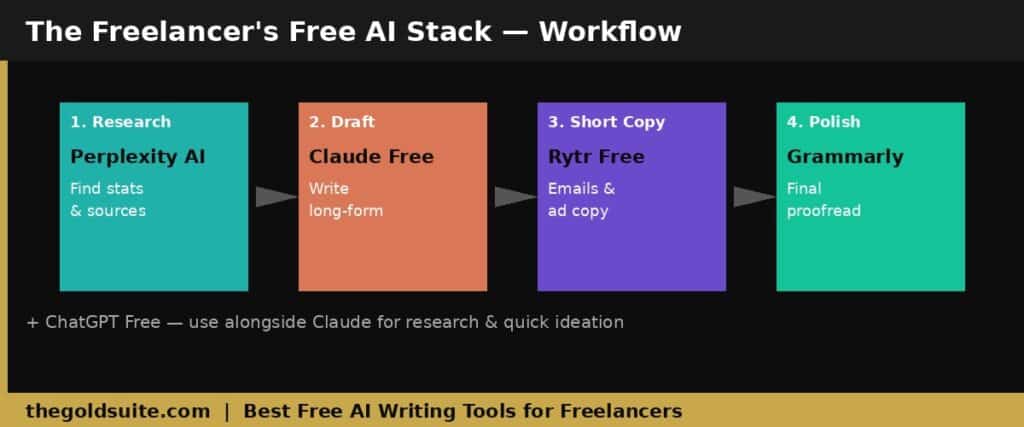
Five tools sounds like five browser tabs always open. It doesn’t have to work that way.
Here’s the lean workflow that makes this stack efficient:
→ Research phase: Perplexity for niche background and statistics. 10 to 15 minutes max.
→ Drafting phase: ChatGPT for outline and structure. Claude for the actual draft, especially if the piece needs to sound human and client-ready.
→ Short-form copy: Rytr for emails, subject lines, product descriptions. Batch these together to stay inside the monthly cap.
→ Final pass: Grammarly before every delivery. No exceptions.
That’s it. Four tools, each doing one job well, total cost: $0.
The temptation is to add more tools. Resist it. Every additional tool adds decision fatigue. This stack covers 95% of typical freelance writing work. Master it before adding anything else.
What to Expect from Free Tiers in 2026
Free tiers on AI writing tools have gotten more restrictive, not less. The caps are getting tighter as companies push users toward paid plans.
Here’s the reality as of 2026: ChatGPT Free gives you roughly 10 to 15 high-intelligence responses before quality drops. Claude Free hits a daily cap fast. Rytr Free is 10,000 characters per month. Writesonic’s free plan is effectively a trial: one article, five chats, then a paywall.
For occasional AI-assisted work, free tiers hold up. For full-time use, the $20 per month upgrade on ChatGPT or Claude pays for itself in the first week.
Use the free tiers to build the habit. Then upgrade the one tool you rely on most.
The Bottom Line for Freelancers
The best free AI writing tools in 2026 are ChatGPT, Claude, Rytr, Perplexity, and Grammarly. Each covers a distinct part of your workflow. Start with Claude for drafting and ChatGPT for research and ideation. Add Rytr for short-form copy. Run everything through Grammarly before delivery. That stack costs nothing and covers the majority of what freelance writing work demands. The goal isn’t to use more AI. It’s to use the right tools in the right order so your output is faster and more consistent than the freelancer competing for the same clients.
Best Free AI Writing Tools for Freelancers FAQs
What is the best free AI writing tool for freelancers in 2026?
Claude Free is the best option for long-form writing quality. Its output sounds more natural than most alternatives. For versatility, ChatGPT Free is the stronger all-rounder. Most working freelancers use both: Claude for drafting, ChatGPT for research.
Are free AI writing tools good enough for professional client work?
For most freelance work, yes — with caveats. Free tiers on ChatGPT and Claude produce professional-quality output. The real issue is usage limits: free plans cap how much you can do in a day. For full-time AI-heavy workflows, a $20 per month upgrade on your primary tool pays for itself quickly.
What is the difference between ChatGPT and Claude for freelance writing?
ChatGPT handles structured drafts, research, and short-form tasks well. Claude produces writing that reads more naturally and handles tone-matching well. Most experienced freelancers use both in combination rather than choosing one exclusively.
Is Rytr free actually useful for freelancers?
Yes, for short-form copy. Rytr’s free tier (10,000 characters per month) is useful for emails, ad copy, product descriptions, and social captions. Built-in use-case templates and tone controls make it faster than prompting ChatGPT or Claude from scratch for structured short-form formats.
Do I need to disclose AI use to freelance clients?
Check your client contracts before using AI on any project. Many clients allow it; some require disclosure or prohibit it entirely. When in doubt, disclose. It protects you and builds trust.